Integrating Trustoo Reviews with PageFly
Overview
Our review widget can be seamlessly integrated with your PageFly-created product pages. Follow these simple steps to display customer reviews on your custom-designed pages.
Integration Instructions
Step 1: Access PageFly Dashboard
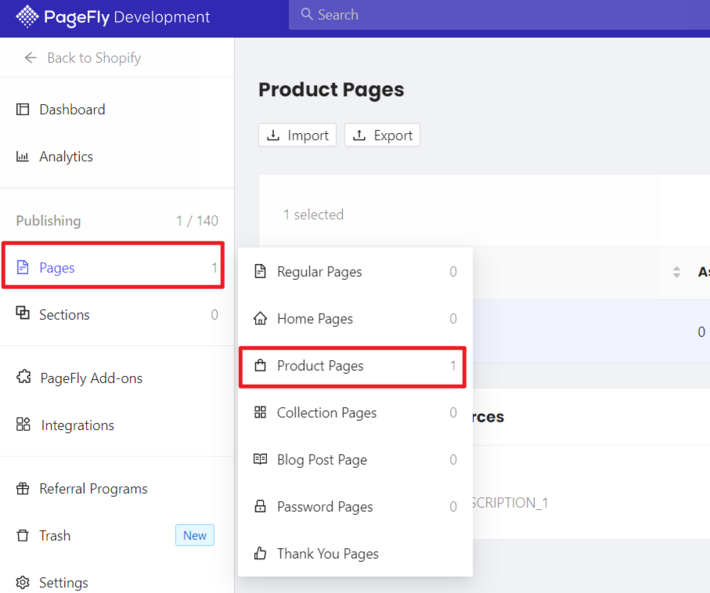
Navigate to the Page section in your PageFly dashboard
Step 2: Select Product Page
Select the specific product page you've created
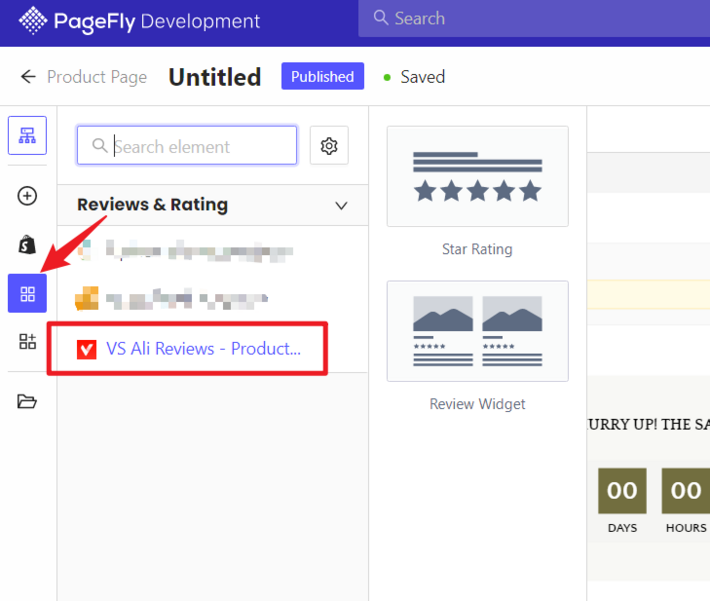
Step 3: Add Third-Party Elements
- Click on Add third-party elements
Step 4: Select App Element
Find and select our app element from the available options
Important Note
⚠️ The review widget can only work on a Product Page or inside a Product Details element.
Benefits of Integration
Key Advantages
- Enhance custom-designed product pages with social proof
- Maintain consistent review display across all product pages
- Leverage PageFly's design flexibility
- Utilize powerful review features
- Improve conversion rates by showcasing customer feedback
Best Practices
- Carefully position the review widget
- Ensure widget complements page design
- Test integration across different product pages
- Verify widget responsiveness
Troubleshooting
- Check widget placement
- Ensure compatibility with PageFly version
- Verify product page settings
- Test on multiple devices
Compatibility
- Works with custom PageFly layouts
- Supports various product page designs
- Maintains consistent review display
Support
Encounter issues during integration or have questions about widget compatibility?
- Contact our support team
- Provide detailed information about your specific setup
- Get personalized assistance
Next Steps
- Install Trustoo app
- Configure review settings
- Integrate with PageFly
- Test and optimize
Conclusion
Seamlessly blend powerful customer reviews with your custom PageFly design to create a compelling product page experience.